 xiantang
345 lines
8.3 KiB
Markdown
345 lines
8.3 KiB
Markdown
# :cloud: Air - Live reload for Go apps
|
||
|
||
[](https://github.com/air-verse/air/actions?query=workflow%3AGo+branch%3Amaster) [](https://www.codacy.com/gh/air-verse/air/dashboard?utm_source=github.com&utm_medium=referral&utm_content=air-verse/air&utm_campaign=Badge_Grade) [](https://goreportcard.com/report/github.com/air-verse/air) [](https://codecov.io/gh/air-verse/air)
|
||
|
||

|
||
|
||
[English](README.md) | [简体中文](README-zh_cn.md) | 繁體中文
|
||
|
||
## 開發動機
|
||
|
||
當我開始用 Go 開發網站並使用[gin](https://github.com/gin-gonic/gin)框架時,感到可惜的是 gin 缺乏自動重新編譯執行的方式。因此,我四處搜尋並嘗試使用[fresh](https://github.com/pilu/fresh),但它似乎不夠彈性,所以我打算重新寫得更好。最後,Air 就這麼誕生了。另外,非常感謝[pilu](https://github.com/pilu),如果沒有 fresh,就不會有 air :)
|
||
|
||
Air 是一個另類的自動重新編譯執行命令列工具,用於開發 Go 應用。在你的項目根目錄下運行 `air`,將它執行於背景中,並專注於你的程式碼。
|
||
|
||
注意:此工具與生產環境的熱部署無關。
|
||
|
||
## 功能列表
|
||
|
||
- 彩色的日誌輸出
|
||
- 自訂建立或任何命令
|
||
- 支援排除子目錄
|
||
- 允許在 Air 開始後監視新目錄
|
||
- 更佳的建置過程
|
||
|
||
### 用參數覆寫指定的配置
|
||
|
||
支援將 air 做為參數的配置字段:
|
||
|
||
如果你想設定建置命令和執行命令,你可以在不需要配置檔案的情況下如下使用命令:
|
||
|
||
```shell
|
||
air --build.cmd "go build -o bin/api cmd/run.go" --build.entrypoint "./bin/api"
|
||
```
|
||
|
||
對於需要輸入列表的參數,可以使用逗號將項目分隔:
|
||
|
||
```shell
|
||
air --build.cmd "go build -o bin/api cmd/run.go" --build.entrypoint "./bin/api" --build.exclude_dir "templates,build"
|
||
```
|
||
|
||
舊的 `build.bin` 欄位已被棄用,未來版本會移除,請改用 `build.entrypoint`。
|
||
|
||
`build.entrypoint` 可以寫成單一字串(只指定執行檔),也可以寫成字串陣列(執行檔加上預設參數)。
|
||
|
||
## 安裝
|
||
|
||
### 使用 `go install` (推薦)
|
||
|
||
需要使用 go 1.25 或更高版本:
|
||
|
||
```shell
|
||
go install github.com/air-verse/air@latest
|
||
```
|
||
|
||
### 使用 `go get -tool`
|
||
|
||
需要使用 go 1.25 或更高版本:
|
||
|
||
```shell
|
||
go get -tool github.com/air-verse/air@latest
|
||
|
||
# 然後這樣使用:
|
||
go tool air -v
|
||
```
|
||
|
||
### 透過 install.sh
|
||
|
||
```shell
|
||
# binary will be $(go env GOPATH)/bin/air
|
||
curl -sSfL https://raw.githubusercontent.com/air-verse/air/master/install.sh | sh -s -- -b $(go env GOPATH)/bin
|
||
|
||
# or install it into ./bin/
|
||
curl -sSfL https://raw.githubusercontent.com/air-verse/air/master/install.sh | sh -s
|
||
|
||
air -v
|
||
```
|
||
|
||
### 透過 [goblin.run](https://goblin.run)
|
||
|
||
```shell
|
||
# binary will be /usr/local/bin/air
|
||
curl -sSfL https://goblin.run/github.com/air-verse/air | sh
|
||
|
||
# to put to a custom path
|
||
curl -sSfL https://goblin.run/github.com/air-verse/air | PREFIX=/tmp sh
|
||
```
|
||
|
||
### 使用軟體套件管理器 [mise](https://github.com/jdx/mise)
|
||
|
||
```shell
|
||
mise use -g air
|
||
```
|
||
|
||
### 透過 [Scoop](https://scoop.sh)
|
||
|
||
```shell
|
||
scoop install air
|
||
```
|
||
|
||
### 透過 `go install`
|
||
|
||
使用 go 1.25 或更高版本:
|
||
|
||
```bash
|
||
go install github.com/air-verse/air@latest
|
||
```
|
||
|
||
### Docker/Podman
|
||
|
||
請讀取 Docker 映像檔 [cosmtrek/air](https://hub.docker.com/r/cosmtrek/air).
|
||
|
||
```shell
|
||
docker/podman run -it --rm \
|
||
-w "<PROJECT>" \
|
||
-e "air_wd=<PROJECT>" \
|
||
-v $(pwd):<PROJECT> \
|
||
-p <PORT>:<APP SERVER PORT> \
|
||
cosmtrek/air
|
||
-c <CONF>
|
||
```
|
||
|
||
#### Docker/Podman .${SHELL}rc
|
||
|
||
如果你想像常規應用程式一樣持續使用 air,你可以在你的 ${SHELL}rc (Bash, Zsh, etc…) 中創建一個函數。
|
||
|
||
```shell
|
||
air() {
|
||
podman/docker run -it --rm \
|
||
-w "$PWD" -v "$PWD":"$PWD" \
|
||
-p "$AIR_PORT":"$AIR_PORT" \
|
||
docker.io/cosmtrek/air "$@"
|
||
}
|
||
```
|
||
|
||
`<PROJECT>` 是你的容器中的專案路徑,例如:/go/example 如果你想要進入容器,請加上 --entrypoint=bash。
|
||
|
||
<details>
|
||
<summary>For example</summary>
|
||
|
||
我其中一個專案是在 Docker 中運行
|
||
|
||
```shell
|
||
docker run -it --rm \
|
||
-w "/go/src/github.com/cosmtrek/hub" \
|
||
-v $(pwd):/go/src/github.com/cosmtrek/hub \
|
||
-p 9090:9090 \
|
||
cosmtrek/air
|
||
```
|
||
|
||
另一個例子
|
||
|
||
```shell
|
||
cd /go/src/github.com/cosmtrek/hub
|
||
AIR_PORT=8080 air -c "config.toml"
|
||
```
|
||
|
||
這將會用當前目錄替換 `$PWD`,`$AIR_PORT` 是發佈的端口,`$@` 是用來接受應用程式本身的參數,例如 -c
|
||
|
||
</details>
|
||
|
||
## 使用方式
|
||
|
||
如果你使用 `go install` 安裝 Air,請確認你的 Go bin 目錄已加入 `PATH`:
|
||
|
||
```shell
|
||
export PATH="$PATH:$(go env GOPATH)/bin"
|
||
```
|
||
|
||
首先,進入你的專案目錄
|
||
|
||
```shell
|
||
cd /path/to/your_project
|
||
```
|
||
|
||
最簡單的使用方式是運行
|
||
|
||
```shell
|
||
# 先嘗試讀取目前目錄中的 `.air.toml`;如果不存在,則使用預設配置
|
||
air
|
||
```
|
||
|
||
如果要明確指定配置檔,可以使用:
|
||
|
||
```shell
|
||
air -c .air.toml
|
||
```
|
||
|
||
你可以用以下命令初始化 `.air.toml` 配置檔到當前目錄,並使用預設設置。
|
||
|
||
```shell
|
||
air init
|
||
```
|
||
|
||
此後,你可以只運行 `air` 命令,而不需要額外的參數,它將使用 `.air.toml` 檔案作為配置。
|
||
|
||
```shell
|
||
air
|
||
```
|
||
|
||
要修改配置,請參閱 [air_example.toml](air_example.toml) 檔案。
|
||
|
||
### 運行時參數
|
||
|
||
你可以在 air 命令後添加參數來運行已構建的二進制檔。
|
||
|
||
```shell
|
||
# Will run ./tmp/main bench
|
||
air bench
|
||
|
||
# Will run ./tmp/main server --port 8080
|
||
air server --port 8080
|
||
```
|
||
|
||
你可以使用 `--` 參數來分隔傳遞給 air 命令和已建構的二進制檔的參數。
|
||
|
||
```shell
|
||
# Will run ./tmp/main -h
|
||
air -- -h
|
||
|
||
# Will run air with custom config and pass -h argument to the built binary
|
||
air -c .air.toml -- -h
|
||
```
|
||
|
||
### Docker Compose
|
||
|
||
```yaml
|
||
services:
|
||
my-project-with-air:
|
||
image: cosmtrek/air
|
||
# working_dir value has to be the same of mapped volume
|
||
working_dir: /project-package
|
||
ports:
|
||
- <any>:<any>
|
||
environment:
|
||
- ENV_A=${ENV_A}
|
||
- ENV_B=${ENV_B}
|
||
- ENV_C=${ENV_C}
|
||
volumes:
|
||
- ./project-relative-path/:/project-package/
|
||
```
|
||
|
||
### 除錯
|
||
|
||
`air -d` prints all logs.
|
||
|
||
## 對於不想使用 air 映像的 Docker 使用者的安裝與使用方法
|
||
|
||
`Dockerfile`
|
||
|
||
```Dockerfile
|
||
# Choose whatever you want, version >= 1.25
|
||
FROM golang:1.25-alpine
|
||
|
||
WORKDIR /app
|
||
|
||
RUN go install github.com/air-verse/air@latest
|
||
|
||
COPY go.mod go.sum ./
|
||
RUN go mod download
|
||
|
||
CMD ["air", "-c", ".air.toml"]
|
||
```
|
||
|
||
`docker-compose.yaml`
|
||
|
||
```yaml
|
||
version: "3.8"
|
||
services:
|
||
web:
|
||
build:
|
||
context: .
|
||
# Correct the path to your Dockerfile
|
||
dockerfile: Dockerfile
|
||
ports:
|
||
- 8080:3000
|
||
# Important to bind/mount your codebase dir to /app dir for live reload
|
||
volumes:
|
||
- ./:/app
|
||
```
|
||
|
||
## Q&A
|
||
|
||
### "找不到命令:air" 或者 "找不到檔案或目錄"
|
||
|
||
```shell
|
||
export GOPATH=$HOME/xxxxx
|
||
export PATH=$PATH:$GOROOT/bin:$GOPATH/bin
|
||
export PATH=$PATH:$(go env GOPATH)/bin <---- Confirm this line in you profile!!!
|
||
```
|
||
|
||
### 當 bin 中包含 ' 時,在 wsl 下的錯誤
|
||
|
||
應該使用 `\` 來轉義 bin 中的 `'。相關議題:[#305](https://github.com/air-verse/air/issues/305)
|
||
|
||
## 開發
|
||
|
||
請注意:目前需要 Go 1.25+(請參考 `go.mod`)。
|
||
|
||
```shell
|
||
# Fork this project
|
||
|
||
# Clone it
|
||
mkdir -p $GOPATH/src/github.com/cosmtrek
|
||
cd $GOPATH/src/github.com/cosmtrek
|
||
git clone git@github.com:<YOUR USERNAME>/air.git
|
||
|
||
# Install dependencies
|
||
cd air
|
||
make ci
|
||
|
||
# Explore it and happy hacking!
|
||
make install
|
||
```
|
||
|
||
歡迎提出 Pull Request
|
||
|
||
### 發佈版本
|
||
|
||
```shell
|
||
# Checkout to master
|
||
git checkout master
|
||
|
||
# Add the version that needs to be released
|
||
git tag v1.xx.x
|
||
|
||
# Push to remote
|
||
git push origin v1.xx.x
|
||
|
||
# The CI will process and release a new version. Wait about 5 min, and you can fetch the latest version
|
||
```
|
||
|
||
## 星星歷史
|
||
|
||
[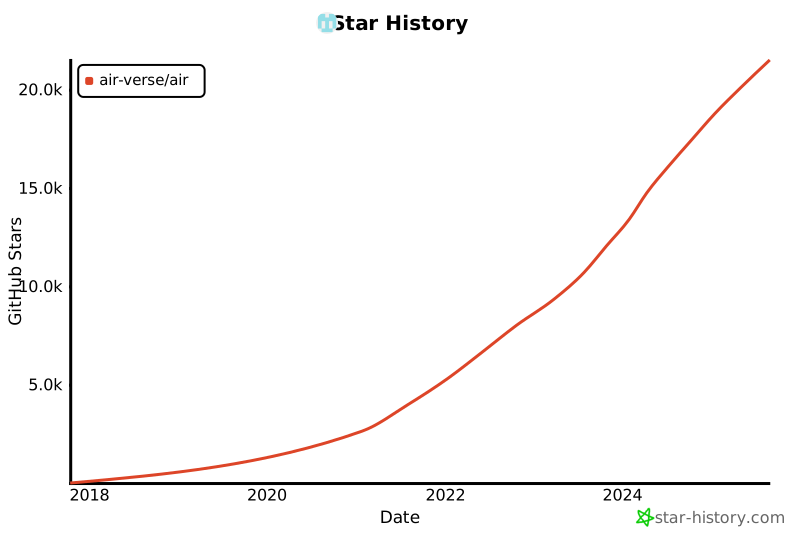](https://star-history.com/#air-verse/air&Date)
|
||
|
||
## 贊助專案
|
||
|
||
[](https://www.buymeacoffee.com/cosmtrek)
|
||
|
||
非常感謝大量的支持者。我一直記得你們的善意。
|
||
|
||
## 授權
|
||
|
||
[GNU General Public License v3.0](LICENSE)
|